AuroraMe: Northern Lights App
- 4.4
- Rating
- 10.00K
- Installs
- Free
- Price

 Analysis by App-foxy
I came away from AuroraMe with the impression that it is less about casually checking the weather and more about turning a possible northern-lights sighting into a manageable plan. That distinction matters. An ordinary weather app can tell you whether clouds or rain may spoil an evening, but this app focuses on the aurora itself, giving the experience a more specialized purpose for anyone who is willing to wait, travel, or simply step outside at the right moment.
My overall view is positive, with one important qualification: AuroraMe is most useful when you treat it as a planning companion rather than a promise that the sky will light up. Its alerts, Kp information, three-dimensional map, and trip-oriented approach give it more practical value than a simple “aurora visible” indicator. At the same time, the subject is naturally uncertain, so even a well-presented forecast cannot remove the need for patience, clear skies, and a little luck.
What makes AuroraMe useful for watching the northern lights
The app comes from Adventure Walkers and sits in the weather category, but its narrow focus gives it a different feel from the broad forecast tools most people already have installed. Instead of asking whether the day will be warm or whether tomorrow will be rainy, it helps answer a more specific question: is it worth preparing for an aurora watch tonight, and where should I pay attention?
You May Also Like

 AccuWeather: Weather Radar
AccuWeather Review: A Quick, Clear Forecast for Everyday Decisions
For everyday plans, the best forecast is the one you can understand quickly. AccuWeather makes rain timing, radar, and local conditions easy to act on, with a few trade-offs.

 Hill Climb Racing
Why Hill Climb Racing Still Turns Crashes Into One More Run
A tiny car, a bumpy hill and one more upgrade: Hill Climb Racing keeps resurfacing because its simple chaos makes every near-miss feel personal.

 AliExpress - Shopping App
AliExpress Makes Global Shopping Feel Personal, but Shoppers Bear the Risk
AliExpress turns a global marketplace into a pocket-sized discovery engine. Its reach is useful, its shopping loop compelling, and its trade-offs easy to miss.

 Lords Mobile: Kingdom Wars
Lords Mobile Is a Kingdom-Building Routine, Not a Quick Match
A case-by-case verdict on the building, battles, device demands, and social commitments that make Lords Mobile rewarding for some players and exhausting for others.

 PDF Scanner app - TapScanner
TapScanner Makes Paperwork Easier to Capture, Check, and Share
TapScanner makes scanning with a phone feel less like a rescue operation and more like a dependable step in getting work done. Its capture tools are useful, though not flawless.

 Block Blast!
 Shows How Much a Puzzle Game Can Leave Out
A quiet grid game shows why puzzle players increasingly value instant clarity, repeatable skill and low-pressure play—and where the genre still needs to catch up.
More From Our News Desk
View All News


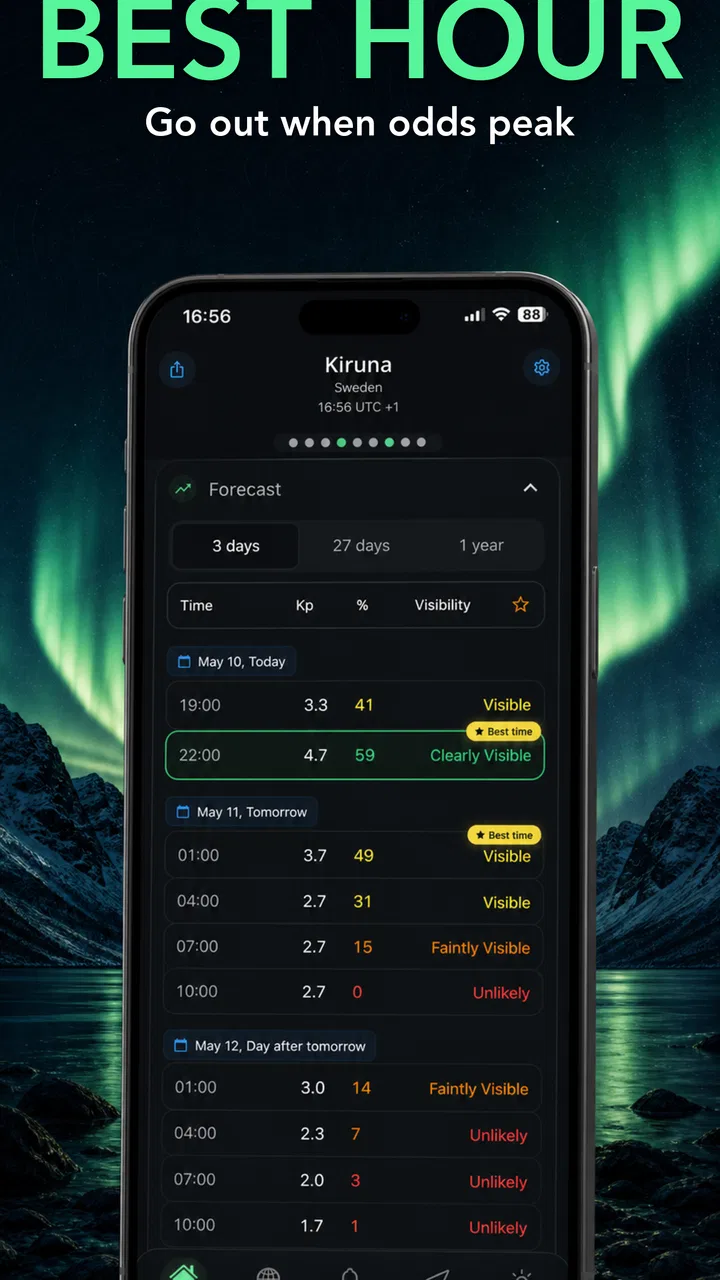
That focus is the app’s strongest argument. The headline tools are not presented as unrelated extras. Free alerts, the Kp index, a three-dimensional map, and trip planning all support different stages of the same activity. I can imagine checking the general outlook earlier in the week, using the map to understand the viewing area, and then relying on an alert when conditions become worth considering. That is a more useful workflow than repeatedly opening a generic weather app and searching for a small space-weather detail.
The Kp index is particularly helpful for newcomers because it gives a familiar reference point for auroral activity. I would not use it as a guarantee of what I will see from my exact location, but it provides context when comparing a quiet evening with a more promising one. The practical lesson is to combine that signal with local visibility and cloud conditions instead of treating one number as the entire forecast.
The three-dimensional map is another meaningful strength. A flat map can show locations, but a spatial view is better suited to an event that depends on position, direction, and the relationship between an observer and a moving band of activity. I found this kind of presentation more useful for thinking about a viewing spot than a plain list of places. It encourages planning around geography rather than assuming that the same forecast means the same experience everywhere.
That map also has a subtle advantage for travelers. If I am staying outside a city, driving to a darker area, or comparing two possible stops, I want to understand how the forecast relates to the surrounding region. AuroraMe’s map-based approach makes that decision more visual. It does not replace local knowledge, but it can help me avoid choosing a destination based only on a vague regional label.
How I would use the alerts without overtrusting them
The free alerts are probably the feature that turns AuroraMe from an interesting reference tool into something I might keep installed. Aurora watching often involves waiting through long stretches when nothing happens, and constantly checking a screen is exactly the behavior an alert can reduce. I would rather set the app up before an evening outdoors and let it tell me when conditions deserve attention.
There is a trade-off, though. An alert can notify me about activity, but it cannot make my location dark, clear, or convenient. If I receive one while surrounded by city lights or under thick cloud, the notification may create excitement without producing a view. My best practice would be to treat an alert as a prompt to check the sky, the local forecast, and the practical route—not as an instruction to leave immediately.
For a realistic everyday scenario, imagine planning a weekend visit to a northern destination. During the day, I could use AuroraMe to review the regional outlook and explore the map around the area where I am staying. Before dinner, I might decide whether to remain nearby or prepare for a short drive away from artificial light. If an alert arrives later, I already have a shortlist of possible viewing areas instead of making a rushed decision in the dark.
That workflow is one of the app’s less obvious strengths. The value is not only in the forecast at the moment I open it; it is in reducing the number of decisions I need to make when conditions change. A good aurora evening can be brief, and having a plan matters more than collecting another screenshot from a forecast screen.
Trip planning gives the app a practical edge
The trip element makes sense because aurora viewing is often tied to travel rather than a normal daily commute. People may be visiting a region for several nights, choosing between destinations, or trying to decide when to spend time outdoors. A trip-oriented tool can help organize that uncertainty around a window of opportunity rather than around a single fixed appointment.
I would use it to create a simple decision routine: check the outlook before committing to an excursion, compare the map with the places I can realistically reach, and keep flexibility for another night. That last part is important. The best choice may not be the first evening with a moderately interesting forecast. A traveler with several nights available can use the app to avoid spending all their energy on a marginal opportunity when a later window looks more attractive.
It is also useful for people who are not serious photographers. Aurora apps can sometimes feel aimed only at enthusiasts with cameras and tripods, but the basic use case here is broader. Anyone who wants to know when it is worth stepping outside can benefit from a focused alert and a visual forecast. I could see families, couples, and casual travelers using it to make an evening feel intentional instead of randomly hoping for a sighting.
Still, I would not let the trip feature replace ordinary travel preparation. A map cannot tell me whether a road is safe in winter, whether a viewpoint is open, or whether I should be driving at a particular hour. Those decisions remain outside the app. Its role is to improve the timing and location of the viewing plan, not to function as a complete travel guide.
The experience for beginners and experienced observers
For a first-time aurora watcher, AuroraMe offers a clearer starting point than trying to assemble information from several unrelated sources. The Kp index gives the forecast a useful vocabulary, the map makes the geographic side easier to understand, and alerts reduce the need for constant manual checking. I would recommend beginning with one simple habit: check the app before going out, then look at the real sky and local conditions before making a decision.
Experienced observers may appreciate the convenience more than the novelty. Someone who already follows space-weather information may not find a specialized app revolutionary, especially if they already have a trusted forecasting routine. In that case, AuroraMe’s advantage is concentration. It brings several aurora-oriented views into one place, which can be easier to use during a trip than switching among general weather services, maps, and separate alert tools.
The app is free, which makes trying that workflow relatively easy. Its content rating is Everyone, so it is also approachable for households where several people may want to follow an upcoming opportunity. The current version is 1.6.7, and it supports devices running Android 8.0 or newer. That is worth checking before planning around it, particularly if the app is intended for an older spare phone used during travel.
Its audience is not limited to people living under the auroral zone. Travelers can use it before departure, while residents can use it for spontaneous outings. The difference is that travelers need to combine the app with transportation and accommodation decisions, while local users can respond more quickly when an alert arrives. In both cases, the app is strongest when it helps turn an uncertain forecast into a sensible choice.
Where the app falls short
The main weakness is inherent to the subject but still important to understand: an aurora forecast is not a normal appointment calendar. Even a strong activity signal may not produce a satisfying view from my exact spot. Clouds, light pollution, terrain, timing, and the observer’s ability to reach a suitable location all affect the outcome. AuroraMe can make the decision process better, but it cannot make the phenomenon predictable in the way a daily temperature forecast sometimes feels.
That limitation changes how I judge the alerts and the Kp index. They are useful indicators, not guarantees. A new user may open the app, see an encouraging reading, and expect a dramatic display immediately. I would rather see the app as a reason to investigate further. The most reliable routine is to use its signal alongside a local cloud forecast and a realistic assessment of whether I can reach a dark, safe viewing area.
The three-dimensional map can also require more attention than a simple list. Its richer presentation is valuable when I am comparing locations, but a person who only wants a quick green-or-red answer may find the extra context unnecessary. This is a deliberate trade-off: AuroraMe gives more room for interpretation, while a simpler alternative may be faster for a casual glance.
There is also a financial consideration. The app is free to start, but in-app purchases range from $4.99 to $54.99 per item. That does not automatically make it poor value, yet I would approach paid options carefully. A casual user who checks the sky a few times may have no reason to spend more. A frequent traveler or dedicated observer may be more willing to pay if the additional tools fit a regular planning routine. Before buying anything, I would use the free experience long enough to see whether the alerts and map genuinely change my decisions.
Another practical limitation is that AuroraMe should not be the only app on a travel phone. I would still keep a conventional weather service for cloud cover and local conditions, along with a map or navigation tool for the route. That is not a criticism of its specialization; it is simply the reality of planning an outdoor night. AuroraMe answers the aurora question well, but it is not intended to replace every other source of information needed for a safe outing.
Who should install it, and who should choose something else?
I think AuroraMe is a good fit for anyone who has ever missed an aurora opportunity because they checked too late. It is especially suitable for travelers visiting northern regions, residents who want timely notifications, and beginners who want a single place to learn how activity, location, and timing relate. The combination of free alerts and a visual map gives it a clear purpose beyond simply displaying a forecast.
It is also a sensible choice for someone arranging a multi-night trip. Instead of making one rigid plan, I can use the app to compare opportunities and preserve flexibility. That is a better match for aurora watching than booking one expensive excursion and assuming the sky will cooperate. The app cannot remove the uncertainty, but it can help me make a more informed choice about when to try.
I would be more cautious if I wanted a complete general-weather replacement. A person mainly interested in rain notifications, hourly temperatures, storm warnings, or everyday commuting forecasts should probably stay with a broad weather app. AuroraMe’s specialist focus would be excessive for that purpose. Likewise, someone who already has a detailed aurora workflow and does not need a consolidated map or alerts may gain little from adding another tool.
Photographers should see it as a planning aid rather than a camera companion. It may help decide when and where to go, but the creative work still depends on equipment, exposure choices, composition, and conditions on the ground. The same applies to families: the app can help choose an evening, but warm clothing, transportation, and a safe place to wait remain just as important as the forecast.
One useful habit is to avoid opening the app only when the sky already looks promising. I would check it earlier, note the most practical viewing areas, and then use alerts as a reminder rather than as the entire plan. That small change makes the map and trip features more valuable and reduces the chance of making a hurried, disappointing decision.
My final assessment
AuroraMe succeeds because it understands that northern-lights watching is a timing and location problem, not merely a weather lookup. Its focused design, Kp information, three-dimensional map, trip planning, and free alerts give me a practical way to organize an activity that is otherwise easy to approach randomly. I especially like the idea of preparing a shortlist of viewing locations before an alert arrives, because that is where the app can save real time and reduce unnecessary travel.
Its limitations are equally clear. Forecast signals can be misunderstood, map detail may be more than a casual user needs, and the optional purchases mean that the free starting point may not be the whole experience for everyone. I would also keep a regular weather app beside it, since cloud cover and everyday travel conditions remain essential parts of the decision.
With an average rating of 4.4 from over 350 ratings and more than 10K installs, it has already attracted a modest but encouraging audience. Those figures do not prove that every forecast will satisfy every observer, but they fit my experience of an app with a clear niche and a useful set of tools. Adventure Walkers has built something I would recommend to a friend who is planning an aurora trip or wants a better chance of noticing activity from home.
My verdict is simple: install it if the northern lights are a real goal, not just an occasional curiosity. For dedicated watchers and travelers, the combination of alerts, spatial context, and flexible planning makes it worth trying at no initial cost. For everyday weather needs, choose a broader alternative. AuroraMe is at its best when I use it to make a thoughtful plan, then remember that the final show still belongs to the sky.
FAQs for AuroraMe: Northern Lights App
01What is the primary function of Aurora Forecast Map – AuroraMe?
Aurora Forecast Map – AuroraMe is designed to help users track and predict the visibility of the Northern Lights (auroras) in their area. It offers real-time updates and forecasts, allowing enthusiasts and photographers to plan their viewing experiences effectively. The app uses advanced algorithms to present accurate aurora visibility predictions.
02How accurate are the aurora predictions provided by the app?
The app utilizes data from multiple sources, including satellite imagery and geomagnetic activity readings, to deliver highly accurate aurora forecasts. While no prediction method is foolproof, the app’s integration of these data points ensures a reliable estimation of aurora activity and visibility, making it a trusted choice for users worldwide.
03Is AuroraMe suitable for beginners who are new to aurora watching?
Yes, AuroraMe is user-friendly and suitable for beginners. It provides detailed guides and tips on how to spot auroras, as well as explanations of technical terms. The intuitive interface and straightforward navigation make it easy for newcomers to get started with aurora forecasting and planning their viewing sessions.
04What features does AuroraMe offer to enhance the user experience?
AuroraMe offers a variety of features, including push notifications for aurora alerts, customizable maps with visibility overlays, and cloud cover forecasts. Users can also access historical data to analyze past aurora activity. These features are designed to enhance the user experience and ensure that users never miss an opportunity to witness the auroras.
05Are there any subscription fees or in-app purchases in AuroraMe?
AuroraMe is available as a free download with basic features. However, it offers a premium subscription for users who want access to advanced features such as detailed forecasts, ad-free usage, and extended data analytics. The app provides value for both free and premium users, catering to different levels of interest and involvement.
Pros
- Accurate aurora predictions for planning trips.
- User-friendly interface with intuitive navigation.
- Real-time notifications for aurora alerts.
- Customizable settings for personalized alerts.
- Offline mode available for remote locations.
Cons
- Limited to aurora-related features only.
- Requires a stable internet connection for updates.
- Ads may interrupt user experience occasionally.
- Premium features locked behind a paywall.
- May drain battery with continuous GPS use.

AuroraMe: Northern Lights App
Gallery